2026 · Designed and built, with an AI coding harness Personal
Sidl: trackpad edge gestures for macOS
An open-source macOS menu bar app that adds edge swipes, edge slides and corner clicks to the trackpad, built on private multitouch, display and media APIs.
Published
- 3
- gesture types: swipe, slide, corner click
- 84
- tests, run on CI for each push
- $0
- instead of $9 for a paid tool
- Swift
- C
- MultitouchSupport
- CoreAudio
- DisplayServices
- MediaRemote
- DDC/CI
Context
I saw a post on Threads about a tool that adds gestures to the trackpad you already have. It cost $9, and that was the sale price. I built my own overnight, with a DeepSeek-powered coding harness, and made it free and open source.
Sidl is a menu bar app. It adds three types of input to the trackpad:
- Edge swipes. Swipe in from the left edge to open an app (Terminal by default). Swipe down from the top edge to play or pause.
- Edge slides. Slide on the left edge to change brightness. Slide on the right edge to change volume.
- Corner clicks. Click in the top-left corner for the previous track. Click in the top-right corner for the next track.
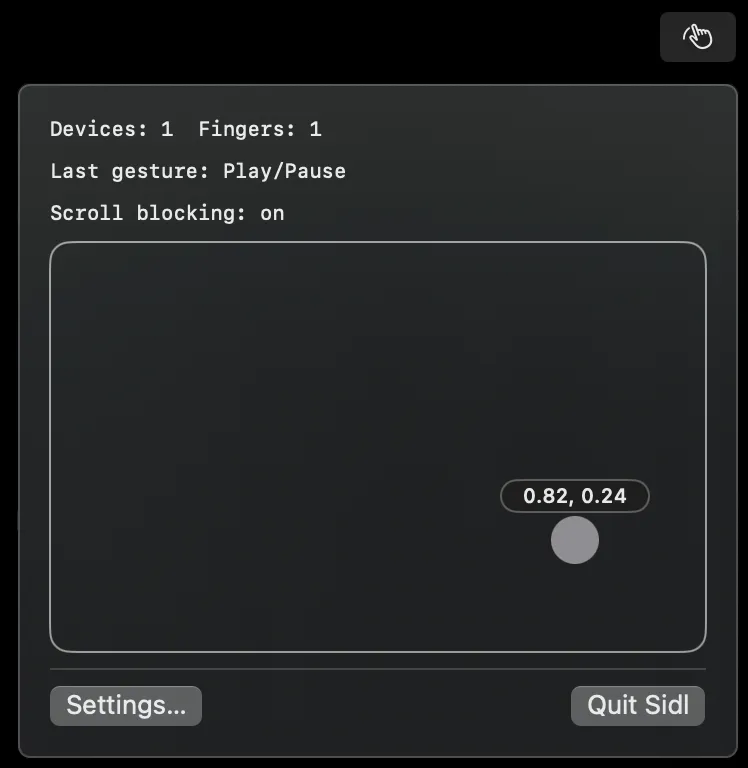
The menu bar panel shows the live touches, the last gesture and whether scroll blocking is on.
Constraints
- No public API for raw touches. macOS gives gestures, not finger positions.
- No public API for brightness or media control. The built-in display, external monitors and “now playing” each need a different private path.
- Normal input must still work. A two-finger slide on an edge is also a scroll, and a corner click is also a click.
- No paid signing. Without an Apple Developer Program membership, each build gets a new ad-hoc identity.
Design
A C shim links the private MultitouchSupport framework and sends raw touch frames to Swift. Each frame goes to TouchHub, which keeps separate gesture state for each trackpad, so frames from two trackpads never mix. Recognizers sort each frame into an edge swipe, an edge slide, or no gesture. A swipe runs a discrete action. A slide sends a continuous change to volume or brightness, and a HUD shows the new level.
Clicks go a different way. An event tap sees each click. If one finger was in a top corner, the tap drops the click and runs that corner’s action.
Key decisions
Zones, not new gestures. Sidl uses 10% strips on the edges and a 12% zone in each top corner. The center of the trackpad keeps all the gestures that macOS gives.
Gestures run on the touch thread. The recognizers run where the frames arrive, not on the main thread. When a slide starts, the event tap can drop its scroll events at once. Momentum scroll events follow the scroll that they belong to.
A slide owns the fingers. When a slide starts on an edge, a swipe on that edge does not also fire. A gesture set to None does not act and does not block scrolling.
Two brightness paths. DisplayServices controls the built-in display. DDC/CI over I2C controls an external monitor on Apple silicon. During a fast slide, Sidl spaces out the writes to the monitor.
Sensitivity as five levels. For a swipe, each level sets the distance a finger must travel, from 20% of the trackpad down to 8%. Five named levels are easier to tune than raw thresholds.
Failure handling
- Tap-to-click sends the click late. macOS sends the click after the finger lifts. The corner detector keeps the last corner for 0.3 s, so the late click still finds its corner.
- Trackpads connect and disconnect. Sidl watches for multitouch devices and reads the device list again 1 s after the last change, and after the Mac wakes.
- The event tap can stop. macOS turns off a slow tap. Sidl turns it on again at once. Until the user gives the Accessibility permission, Sidl tries again every 2 s.
- The permission reset on each build. An ad-hoc signature changes with each build, so macOS sees a new app. A self-signed certificate, with a designated requirement on its leaf hash, keeps the permission across builds.
- Not tested on all hardware. I tested Sidl only on a built-in trackpad and display. A Magic Trackpad, DDC/CI on a real monitor, and Apple external displays are not tested yet.
Result
Sidl runs from the menu bar with a settings window, a HUD, launch at login and a debug view. The source is on GitHub under the MIT license, and the site is sidl.shresthaoshan.com. There is no signed release yet, because a signed release needs the $99-a-year membership. If you can build it yourself, you save the $9.